Wednesday, July 17, 2013

GIS Programming, Participation #2

Title: Application of web-GIS approach for climate change study

Summary:

This article is about climate change and how much data and information is required to study it.  Because this is the case, dealing with that much data can be cumbersome and be detrimental to the outcome.  That is why a web-GIS system has been created.  The article states that some of these single datasets can contain up to tens terabyes!  This system was created for “analysis of georeferenced climatological and meteorological data.”  One of the solutions that is included in this system is object-oriented programming, which is essential to analyzing meteorological data.  The enormous benefit of this system is that the output that is created is a basic binary code that can be produced on any regular computer with an Internet connection.  This allows for more opportunities to analyze the data. 

Since this system doesn’t require much from the computer, it is being used in educational purposes as well.  It is a user-friendly system so that even a computer layman can compute and produce complex analyses.  From my experience using large datasets, it can significantly slow down my computer.  I think creating a system like this is a great idea and will be able to take data analysis so much further, not only in the meteorological industry, but many others.

Tuesday, July 16, 2013

GIS Programming, Lab 7: Geometry & Rasters

This week we had to write two scripts.  The first one was to create a text file that would print out the Object ID and coordinates of the vertices of each shape.  In this case, it was a "rivers" shapefile in Hawaii. 


A screenshot of my text file which displays the ObjectID, coordinates and name of the river/stream.

The second script we had to write created a new raster based on specific criteria pulled from an elevation raster and a landcover raster.  In this case, we pulled out specific forested areas.  This script took a lot of time to figure out and used various modules including relcass, slope and raster and used the spatial analyst extension.

Final raster created from taking specific criteria from two other rasters and saving it into a newly created gdb

This week took a lot of patience, trial and error and aid from classmates and the professor.  It was definitely rewarding once I was successful though.

Applications in GIS, Lab 9: Location Decision Analysis

This week we worked with location analysis and weighted analysis.  The scenario is: a couple is looking for a home in Alachua County, Florida.  The woman is a physician and works at the North Florida Regional Medical center and the man works as a professor at the University Florida.  They have 4 specific criterion which are: Close to NFRMC, close to UF, in a neighborhood with a high percentage of people aged 40-49 and an area with high percentage of home value (home owners).  

Basemap of Alachua County, FL

The first map we created is a base map of the county in which they want to move.  Here you can see cities, major roads, and public lands (and by who they are owned).

Four specific criteria requested by the couple who is house hunting.

The second map we created were 4 different data frames containing each of the criterion.  We used the Euclidean Distance Analysis tool, reclass tool and feature to raster tool to determine which census tracts would be more suitable than others.

Weighted Analysis.  We put more weight on the proximity criteria to change the ideal tracts.

The final map was created with ModelBuilder and the weighted overlay tool.  The map to the left was created with equal parts weighted or each criteria (of 4) was weighted at 25%.  The scenario then had the couple concerned about traffic, so two of their criteria then became more importance.  So we weighed them differently.  The proximity to the hospital and school became more important (weighted at 40%) than the high home value neighborhood and age range.

Wednesday, July 10, 2013

Applications in GIS, Lab 8: GIS in Local Government

This week in lab we learned about how GIS is used in local governments.  In this instance, we focused on land appraisals and how your local county appraisers office uses GIS.  The environment impact of a fly-in community needed to be assessed via the parcels surrounding this selected parcel.  First, we used the Marion County Appraisers Office website to learn about the selected parcel (Mr. Zuko's) and the surrounding area.  This is a screen shot of the image from that website.  You can see there is a jet parked in the driveway....

Aerial image of Mr. Zuko's parcel
Secondly, we made a Environmental Impact Assessment parcel basemap.  Here you can see Mr. Zuko's parcel and the surrounding adjacent parcels that may be impacted.  We used a table to identify each parcel by map key number, parcel ID number, zoning type, owner, acreage and address.  Each parcel is labeled 1-9 and corresponds in the table.  

EIA parcel basemap surrounding Mr. Zuko's parcel.

We also utilized Data Driven Pages which allowed a map book to be created.  Adding a grid to the adjacent parcels let us create a locator map.  We could stay zoomed in to 1:2400 of each grid and while only that data frame changed.  It saves a lot of time and effort if something minor needed to be changed on one map - this way you wouldn't have to go through all 12 maps.

Our final map was part of a different scenario.  The Gulf County Board of County Commissioners (BOCC) wants to build a new extension office and needs to find out some locations that are possible.  The criteria were: 

1. Must be county owned
2. 20 Acres of larger
3. Vacant land

Using various selection by location and attributes searches we were able to narrow it down to two possible parcels that meet the above criteria.  Below, you can see aerial maps with the two parcels selected in red and blue.  The two data frames on the bottom allow close-up views of each parcel including the total acreage. 


Saturday, July 6, 2013

Applications in GIS, Participation #2: Local Governments

Q1: Does your property appraiser offer a web mapping site? If so, what is the web address? If not, what is the method in which you may obtain the data?

Yes, it seems as though the Madison property appraiser offers web mapping – the site is: http://www.madisonpa.com/GIS/Search_F.asp?SalesReport

Q2: What was the selling price of this property? What was the previous selling price of this property (if applicable)? Take a screen shot of the description provided to include with this answer.

6/24/13 was the selling date.  Selling price was: $50,000. The previous selling price listed was $10,000 in 1980.


Q3: What is the assessed land value? Based on land record data, is the assessed land value higher or lower than the last sale price? Include a screen shot.

The assessed land value is $19,612.00.  This is lower than the sale price.


Q4: Share additional information about this piece of land that you find interesting. Many times, a link to the deed will be available providing more insight to the sale.

I found it cool that they included an aerial image and a front building image.  It’s also interesting that the land value is only $19,612 but the building value is $72,288 and it sold for $50,000. 


Q5: Which accounts do you think need review based on land value and what you’ve learned about assessment? Please answer this question within your blog post.

I would think the extremes at either end should be reviewed.  The two (and one tiny triangle) blue parcels, I feel should be worth more than they are.  That is a lot of land and it is split up between two different sections (which I would think would make it more valuable).   On the other hand, I think the one red parcel should be reviewed as well.  What is making it so expensive?  Why is it the only one when it seems like the neighboring parcels are pretty similar?  It's interesting to look at a subdivision in this manner - based on land value.  I always thought that they were all basically the same and worth about the same amount of money.  The parcels with the easements on the land could possible be reviewed too.  Are these easements a positive addition or a negative addition?


Wednesday, July 3, 2013

GIS Programming, Lab 6: Explore & Manipulate Spatial Data

This week definitely tested my sanity! We had to write a script that created a new file geodatabase, copied all the files from our data folder and pasted them, in correct format, into the new .gdb and then create a blank dictionary and then populate it with the names and population of the cities that are categorized as "County Seats."  The toughest hurdle I had was figuring out how to insert the list variable into the print message.  Of course, it was a simple fix and was the ONE option I did not try.  I also struggled with the searchCursor. 

Screenshot of the results of my script - created new gdb, copied the files and printed the cities/populations.

With the help from the instructors and TA's I was able to figure out the issues I was encountering and move forward.  I have had very little experience with programming in my past and am finding it difficult to grasp, but hopefully in the (near) future, things will start clicking.

Tuesday, July 2, 2013

Applications in GIS, Lab 7: Homeland Security - Protect

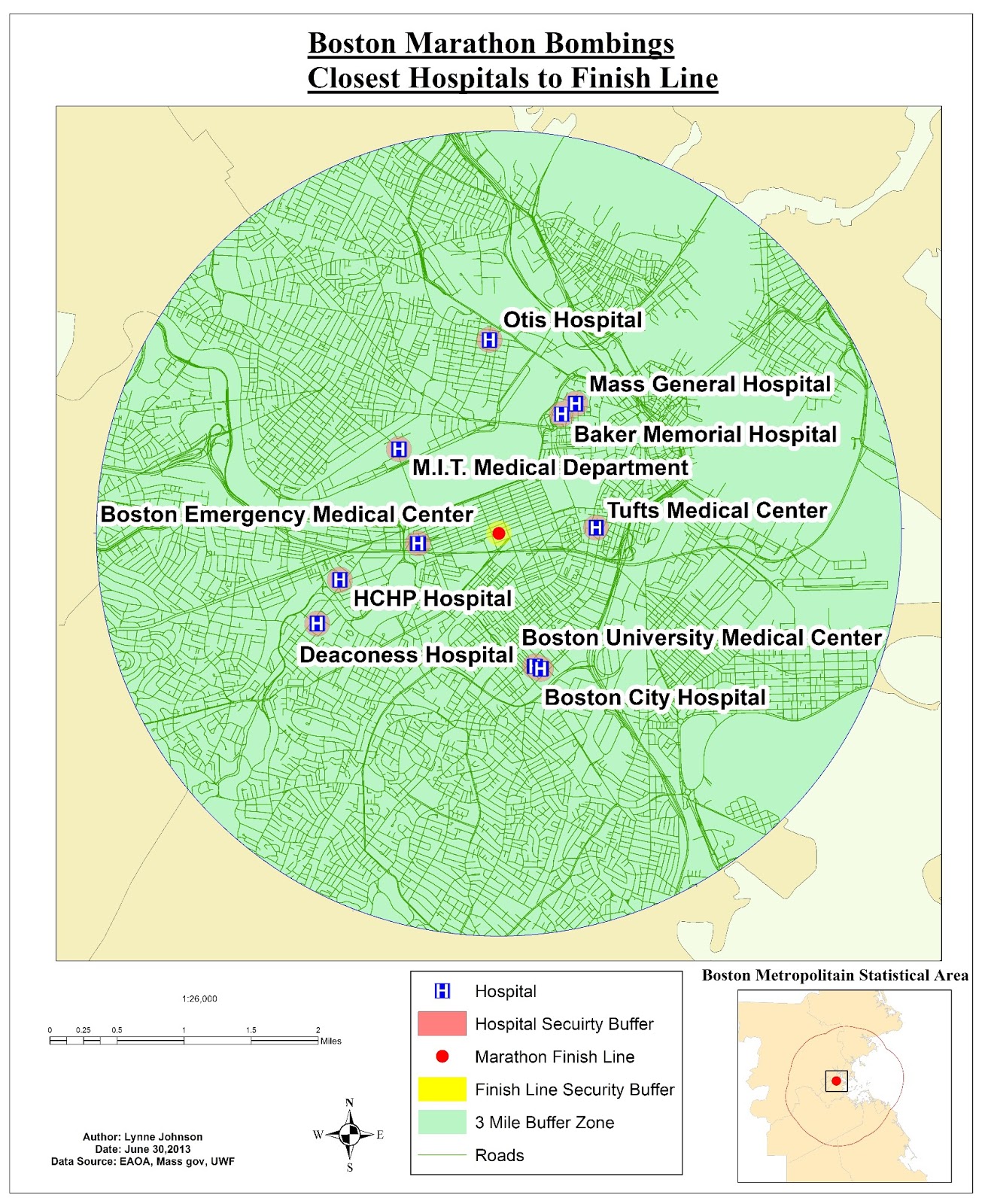
This week we concluded the Homeland Security portion of the course by using the data we prepared last week.  We were focusing on the Boston Marathon bombings and security & surveillance.  The first map we created shows the 10 closest hospitals to the finish line.  Here we took into consideration the types of hospitals and only focused on the non-specialized, non-campus, non-rehab hospitals.  You can see the hospitals are labeled and the local streets were provided as some reference.  I also included an inset map giving you a better idea of where we're focusing.

10 closest hospitals to the marathon finish line
                                     
The second map we created as a security check point buffer.  We created a 500 foot buffer zone around the finish line and placed security checkpoints around the perimeter.  The location of the check points were created where the security zone intersects with the roads.  Again, an inset map was provided for reference.

Security perimeter checkpoint locations surrounding the finish line.

 Finally, the third map I created is a surveillance and line of sight map.  We used hillshade and viewshed.  Hillshade allows you to view where the sun's shade will be at a specific time of day using the altitude and azimuth of a certain location.  The viewshed uses the surveillance points to show you what will and will not be visible.  In this particular map, green is visible and pink is not.  Using the 3D-Analyst tool, I then mapped out a few points and used the finish line as the target location.  There you can see along that line of sight path, where obstruction are.  The red portion of the line is an obstruction and the green is a clear path.

Line of sight and surveillance map of the Boston Marathon finish line.